
In this release, enter a new hashtag inside the release description #careful compatibility they will be noted for improvements that may affect the work of external integrations – please pay special attention to this.
PYTHON3
We’ve been working on this for months, and in this release we’re finally ready to announce that Smarty can run on Python3, or more specifically Python 3.8.
What does this mean in terms of functionality?
At the moment, Smarty works the same for both Python2 and Python3. But in terms of code writing, this opens up new possibilities for us, so we are interested in a smooth but persistent transition to the new version of the language.
How will you upgrade to a new version of Python?
Starting with this release, all new Smarty instances will be uploaded to Python3 (and on Debian 10-11, older versions will no longer support the new version of the language and are no longer supported by their developers). Over the next few months, we will begin to gradually offer our current carriers upgrades to newer versions of Debian and Python as part of our technical work, and eventually, when the Python2 Smarty runs out, we will stop supporting it.
In the following releases we will share with you the process of transition to the new version, do not switch:
START MOVIES THROUGH INTEGRATION WITH MEGOGO
Now, with the help of integration with MEGOGO, it is possible to obtain films from the START cinema catalog. In the interface, the films obtained in this way from START do not differ from those obtained directly: they are displayed with a START plaque, located in a separate section of the video library and connected as part of a separate subscription. In addition, the billing Smarty also supports the sale of the bundle MEGOGO+START.
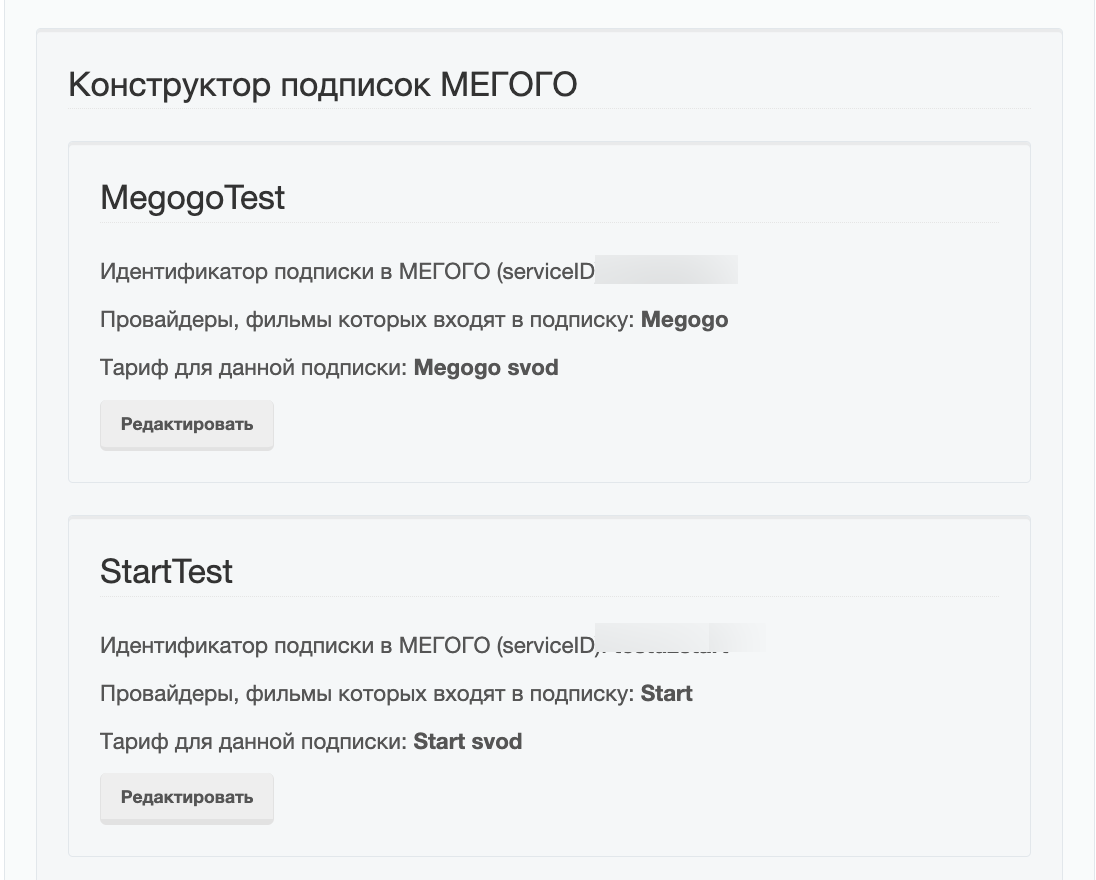
IMPORT OF UHD MOVIES FROM MEGOGO
On the integration settings page with MEGOGO, a new checkbox for synchronizing UHD movies (“Download UHD Content”), which were previously filtered by default and did not fall into the Smarty directory due to the small number of devices that support the playback of this content, appeared. Now, at the discretion of the operator, these films can be added to the catalog.
SERIES SEASONS
In Smarty, new entities appeared: Series and Season. With the help of them, it is now possible to combine several seasons of series within one film object.
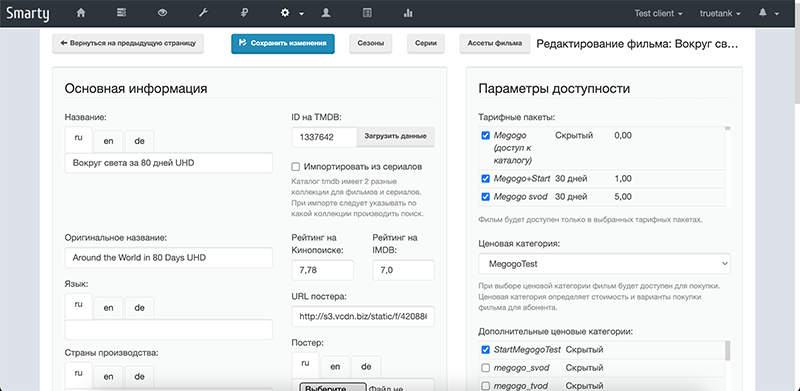
The functionality is currently only available in Smarty, and season display is not added to app templates.
In a future release, we will add seasons to templates Futuristic and Infinitlywe also add the possibility of migrating catalogues of external cinemas to the new scheme.
PRICE CATEGORIES FOR VIDEOS
We’ve done a lot of refactoring of the price categories so that the monetization of movies is less of a concern. So, below is a brief guide on how to set up different options for buying internal videos (purchase and subscription of videos from external theaters MEGOGO and START occurs with the participation of billing theaters).
In Smarty, there are 3 global types of movie monetization:
- subscription is the model currently used to monetize channels and for movies it works in a similar way: through charging rates on the movie object and subscriber/account.
- purchase - just for this model, you need to use price categories with types: purchase (one-time purchase of a film "forever") and rent (purchase of a film for a limited number of days).
- free viewing - for this we can either attach the film price category with the type "free" or add the film to the free tariff plan.
INTEGRATION OF SMS GATEWAYS PULSEEM AND SMS-ASSISTENT
+2 integration of SMS gateways on our account:
- Pulseem – works in Israel https://www.pulseem.co.il/
- SMS-assistant – works in Belarus https://sms-assistent.by/
Documentation for setting up SMS gateways: https://mi-smarty-docs.readthedocs.io/ru/latest/installation_and_configuration.html?highlight=sms#sms
SENDING SMS MESSAGES ABOUT THE END OF THE SUBSCRIPTION
Team send_activation_expires_messages it has long been present in Smarty and is used by operators to send messages about the termination of subscriptions to TV screens and e-mail. In this release, it became possible to also send SMS messages, transferring the option to this command -send_sms. In addition, you can now edit the text of the message sent in the “Localization” section in the administration panel.
Attention! For the correct operation of sending SMS messages in Smarty, an SMS gateway should be configured, and the “Phone Number” field is filled with subscribers.
PREPARATION OF WEATHER VISION
Recently, one of our operators experienced a collision in the weather widget if there is an attempt to obtain data for a city with a non-unique name. It was due to the fact that in external weather services previously searched by the name of the city and in a situation where there are more than 1, the weather returned from being the first in the list.
In this release, we solved this problem by adding the ability to specify its identifier for the city in the weather service in the widget settings:
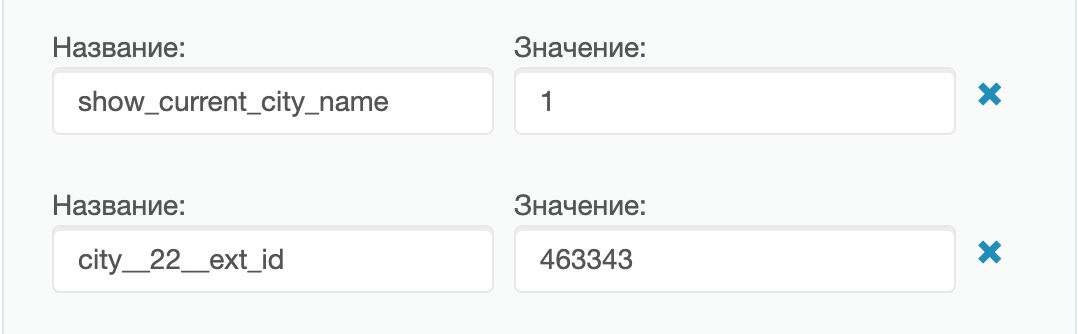
More about setting up the weather widget: https://mi-smarty-docs.readthedocs.io/ru/latest/service_configuration.html#section-32
PARSING EPG DEPARTMENTS
For management commands loading and caching data on transfers cache_record_list, clean_old_records and epg_import added the ability to specify the option clientSo that only one client is affected within Smarty.
And now on the team epg_import it takes into account the possibility of the existence of several EpgChannel with the same external identifier – thanks to this, for example, you can create channels with different icons, but the same transmission program.
NOTICES IN ADMINCA
Along with the growth of the subscriber base, some of our operators have problems with delays in the operation of the administration panel inside the “Statistics” section – it is understandable that the more data is collected, the more time it takes to calculate the numbers when constructing graphs.
In this release, we have slightly upgraded the UX of our admin for the ability to create deferred graphing tasks with the new Notifications section.
Now, if the calculations take an impressive time, you can safely leave the page with the schedule and be sure that when the schedule is ready, the admin user will receive a notification about it.
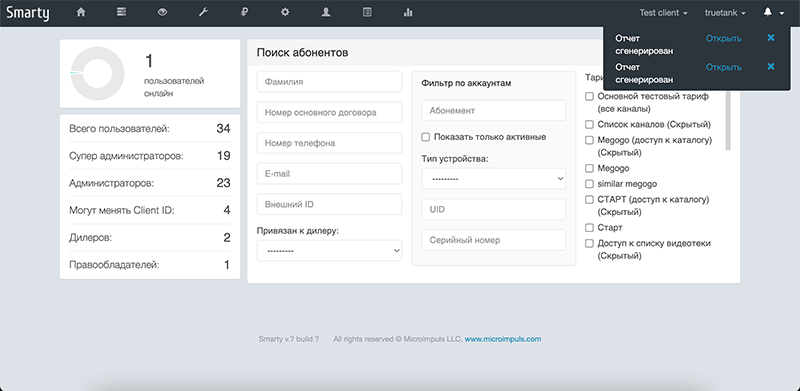
Clicking on the notification will open a page with statistics, where you can view all the latest requests for calculation.
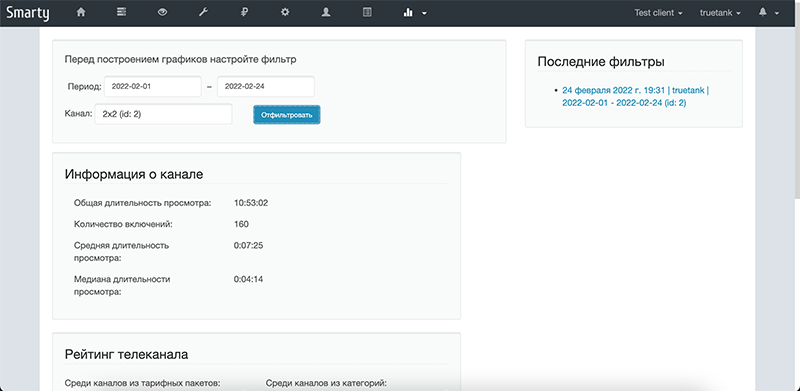
By the next release, we plan to work out the notification functionality in more detail: add the display of notification time, text, attach this functionality to other pages where it is required, and in the meantime – we present you the first version of this feature:
SMART CHANNEL SELECTION
Now TV viewing statistics can not only be viewed and analyzed, but also create a dynamic sorting of channels by popularity. This will help the team create_channel_sorting_by_popularity After adding it to the crown, the operator can get a dynamic sorting of channels, in which the most viewed will be in the top of the list. We remind you that the change of sorting channels is currently available only in the template Impulsesbut we have plans to add this capability to the template Futuristic.
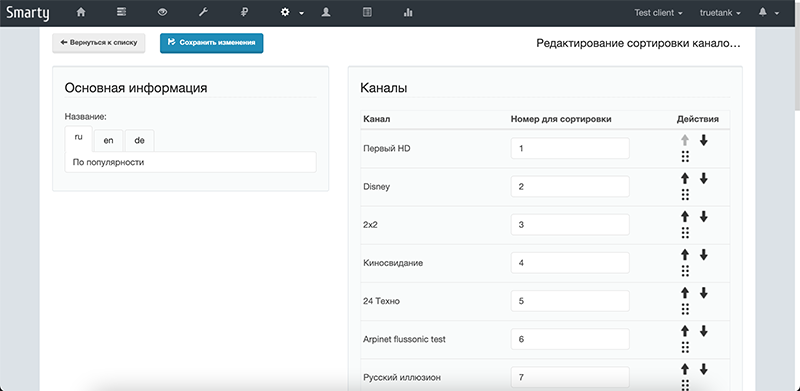
More details: https://micro.im/docs/smarty/configuring-and-management/viewstats#команда-создания-умной-сортировки-каналов
ROTATION OF STATISTICAL DATA
A new command to configure the rotation of the collected statistics used for plotting in the Statistics section in the administration panel: reports_remove_old_datamore details: https://mi-smarty-docs.readthedocs.io/ru/latest/installation_and_configuration.html?highlight=send_activation_expires_messages#smarty-8
ROTATION OF THE HISTORY OF THE FILMS VIEWED
New management team added remove_view_content_history to remove from the database information about the films viewed to the end, more details: https://mi-smarty-docs.readthedocs.io/ru/latest/installation_and_configuration.html#section-28
TVMIDDLEWARE API
- Corrections for the response parameter
slider.urlmethodicallyPortalDashboardSliderList - New method added
AccountResetPasswordpassword reset (previously used method)AccountRegisterwith this release, we recommend using a new method - Input parameter
commentrequestAccountRegistermade unnecessary. - Restored correct film filtering in the method
VideoListin conjunction with the filter by the video provider. - In method
VideoActionnow more detailed information about the error when connecting movies from external theaters (field) is returnederror_message). - In response to methods
VideoList,No AuthVideoListandVideoDetailfieldvideo_provider_id. - Fixed the 500th error when requesting NoAuthSelectionList.
- The ProgramListSearch method is supplemented for register-free search.
- If
PortalDashboardSliderListparameter not transmittedportal_dashboard_idnow the first slider on the list is back. - Field
country/countriesnow come back with an empty line insteadNone of them. - In method
PaymentQRCodeinputtemplateto specify the payment page template that opens with QR. - For the method
ApplicationRSSWidgetcustomizationTVMIDDLEWARE_RSS_WIDGET_REQUEST_TIMEOUTto set a timeout of waiting data from an external news source (by default 3 seconds). - In method
ActorListadded response parametercount. #careful compatibilityFieldphone_confirmation_typedeletedAccountRegisterand transferred to the Client general settings form:

More about the changes in the API: https://microimpuls.github.io/smarty-tvmw-api-docs
BILLING API
- New methods added
AccountListandCustomerListto obtain lists of subscribers and accounts to synchronize lists from Smarty to the billing operator. #careful compatibilityIn methodAccountInfocorrectedis_basic.
More details: https://microimpuls.github.io/smarty-billing-api-docs/
ADMINKA
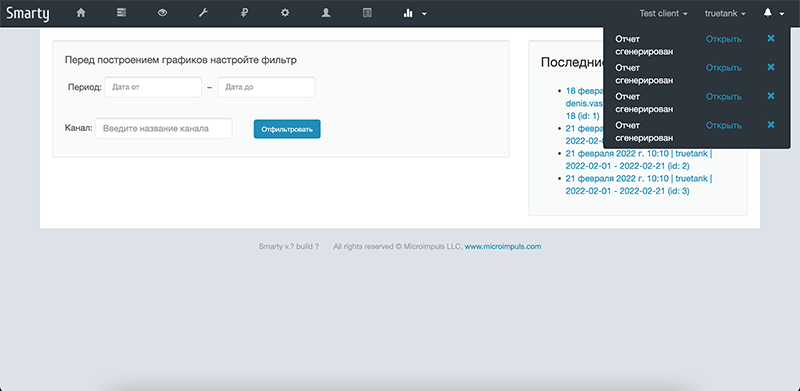
Refactored page "Metrics of TV channels" - filters have become more obvious, the latest requests are saved in the right column for quick access:
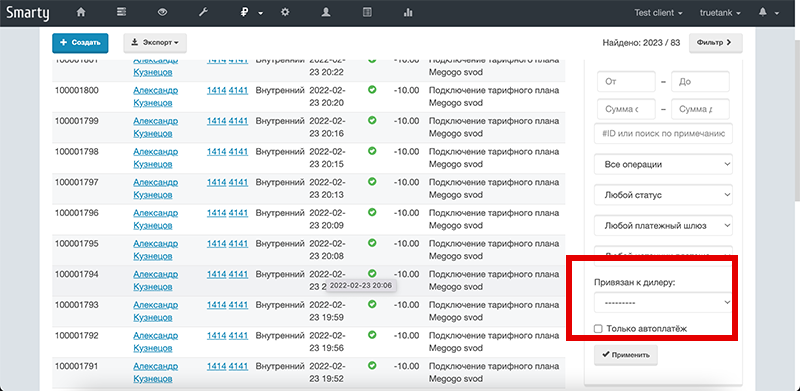
Added a dealer filter to the payment report and financial transactions page:
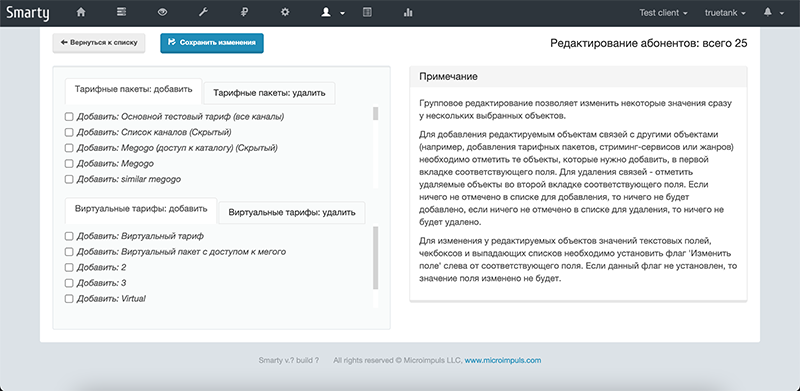
Added the possibility of mass editing of subscribers and accounts:
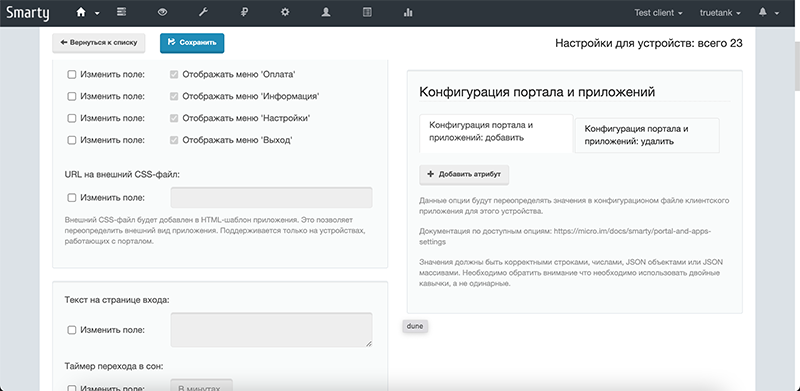
In the form of mass editing devices (playdevice/edit) added the block “Configuration of the portal and applications”:
An LCN column is added to the channel list page:

In the form of mass generation of promo codes added a field to set the length of the code.
