
Microimpuls Smarty — IPTV/OTT service management software. Smarty is a White Label platform through which the operator can develop its own branded independent service with paid and free content.
Smarty consists of an application server (also called Middleware), a portal for Set-Top Box, as well as applications for various Smart TV, mobile and media platforms.
To process and deliver content to subscriber devices, the operator can use additional solutions from Microimpuls (such as Microimpuls Spectr or MicroPVR), or third-party video servers (such as Flussonic or Astra and many others). Smarty can work with almost any third-party software and integrates well with various services.
Microimpuls Smarty Architecture
The diagram below shows the overall architecture of the solution.
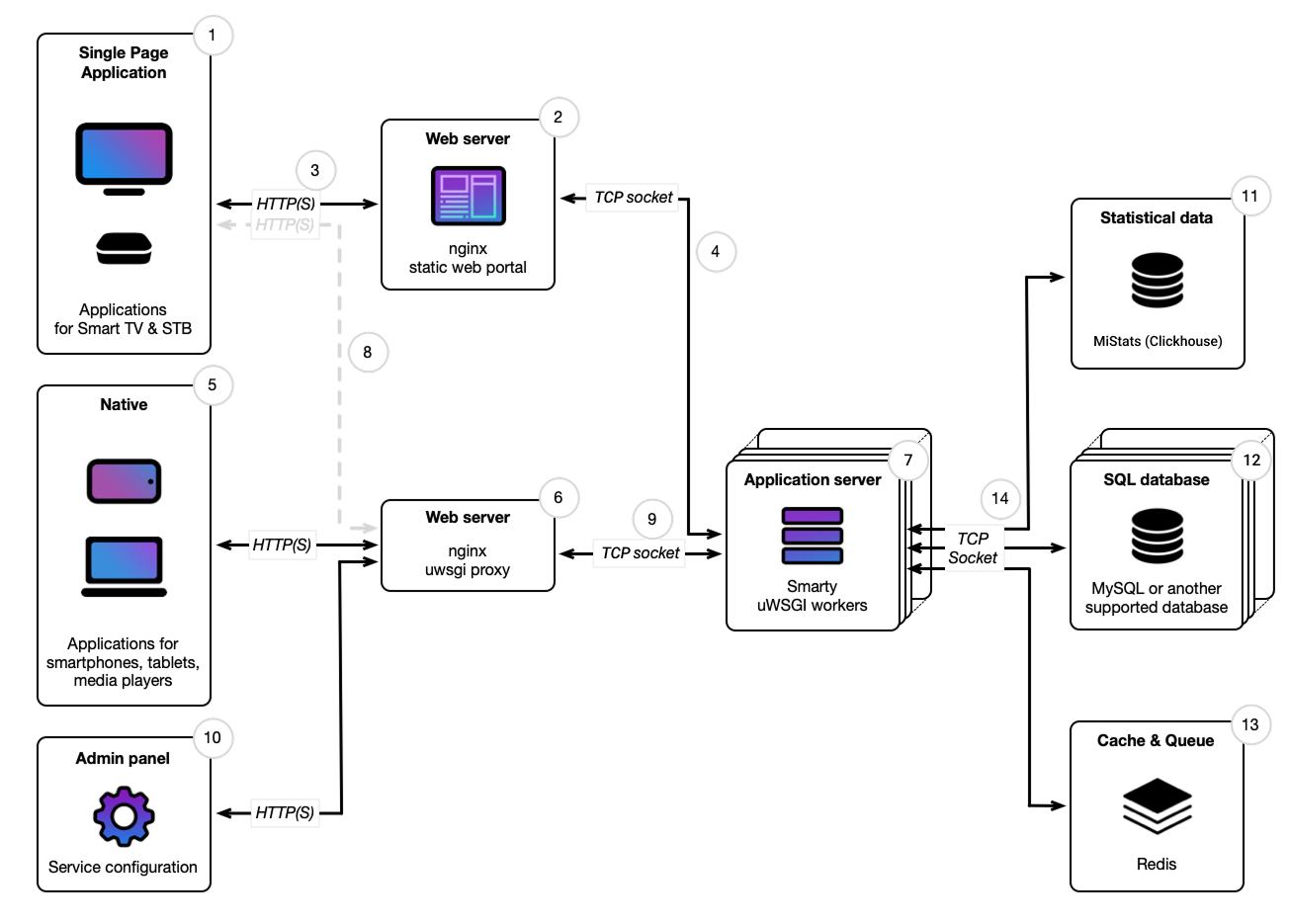
(1) Single Page Applications. Users of IPTV set-top boxes (also called Set-Top Box or STB) and Smart TVs from various manufacturers interact with the IPTV/OTT service by installing an application or firmware through a visual interface implemented as a portal. Technically, it is a static one-page site that dynamically generates screen content and switches content depending on the user’s actions (clicking on the remote buttons).
For Android set-top boxes and Android TV, we provide operators with a separate application, which is a wrapper over the portal (ie, in fact, contains a Webkit browser, which, like most Linux set-top boxes and Smart TV, loads the web portal).
(2) Web server (portal). The portal is located on the web server. We recommend using nginx for hosting. Along with the portal installation package, an example configuration for nginx is deployed on the server.
Nginx processes requests for static portal files (html, js, css and others) as a simple read of local files.
In large high-load services, nginx also acts as an additional caching proxy (the main cache is stored in Redis), thus reducing the load on the application server.
(3) The device browser loads the portal via the HTTP(S) protocol from the web server. Keep in mind that some older devices may not be able to work with modern versions of SSL/TLS.
(4) nginx, which hosts the portal, processes requests /api from applications and directs them to the application server via the uwsgi_path directive. If hosted on different hosts, interaction with the uwsgi server can be configured via tcp sockets instead of local sockets.
(5) Native. For mobile devices and some others, Microimpuls develops individual adapted native applications. Such applications have their own user interface and do not use a web portal.
Like the portal, these applications communicate with the Smarty server through API requests, which are sent to the web server and then proxized to the uwsgi server.
(6) Web server (smarty). As a proxy for HTTP requests from applications to the application server, we also recommend using the nginx web server and offer configuration examples.
In the diagram, entities (2) and (6) are represented in separate blocks, since such separation is a convenient practice of administering and separating requests from applications. However, technically it can also be a common entry point, with a separate location in nginx.
(7) Application server. The application server is a uwsgi server with Smarty service. This service eventually processes all the HTTP REST API requests that have reached it, interacts with databases, authenticates and authorizes, computes and processes information. The uWSGI server runs separate processes called uwsgi-workers, each of which processes its request per unit of time, calculates the result and returns the response to nginx, which in turn returns the response to the application.
(8) In some distributed configurations, it is permissible to specify the API address hosted on another host in the portal settings. In this case, only requests will be made to the portal web server to download static portal resources, and requests to the API will be made directly to the Smarty web server.
For example, it may be useful to place a portal in a device’s firmware (so-called « thick client»); or on an external CDN resource.
With this configuration, it is important to correctly configure CORS policies so that the device browser does not block portal requests to a third-party domain.
(9) The web server communicates with the application server using the WSGI protocol and connects via a Unix socket if the uwsgi and nginx server are hosted on the same host (standard configuration). In the case of hosting on another host, tcp sockets are used to interact with uwsgi.
(10) Admin panel. After installation and basic setup, Smarty is configured through the web control panel. The logic of processing requests is similar to processing requests to APIs. If necessary, using the location setting in nginx, access to the control panel can be limited or transferred to a separate port and domain or to a separate host.
(11) Statistical data. A separate product from the Clickhouse-based MiStats ecosystem is used to store telemetry and other statistics. The product allows you to analyze the TV and video viewing of users in different sections, without loading the main service.
(12) SQL database. To store metadata, Smarty uses a relational database. Interaction with DBMS occurs through the ORM mechanism. Supported databases: MySQL, Maria DB, PostgreSQL. DBMS is a necessary component of the system.
(13) Cache & Queueue. The system of caching and cluster execution of queries in Smarty is implemented on Redis. Redis is a necessary component of the system.
(14) Smarty uwsgi-workers communicate with databases and cache servers via TCP sockets. The Redis server can be placed locally with the uwsgi server to save network bandwidth (standard configuration). We do not recommend hosting uwsgi and SQL/Clickhouse/Redis servers locally on the same host, this option is allowed only for beginner services with a subscriber base of up to 5,000 online users.
